
Advanced Call Settings1.3.2 - Get APK
You'll be able to download in few seconds.
Publisher Description
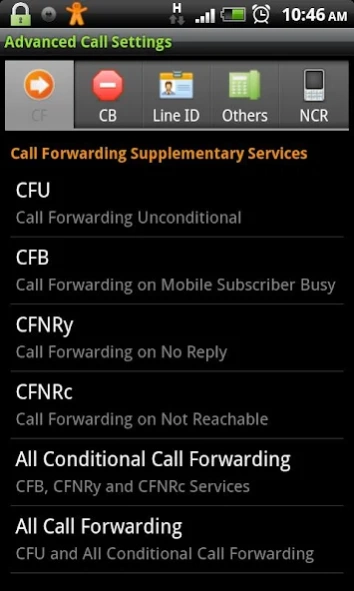
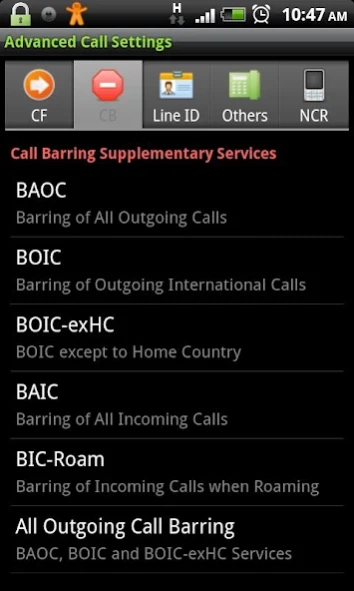
Enhanced replacement for the Call Settings menu on Android phone.
Advanced Call Settings – an essential app for your mobile phone.
Advanced Call Settings is a replacement for the Call Settings menu on Android phone. This app covers all functions in the Call Settings menu, and it includes many advanced settings that you can not do with the built-in Call Settings menu.
★ PREREQUISITE:
BEFORE USING this app, you have to MAKE PROVISIONING FOR THE APPROPRIATE SUPPLEMENTARY SERVICES with your mobile service provider (your mobile network operator).
★ Some terms and definitions:
- Basic mobile service: telephony (voice call), facsimile (fax call), SMS, data…
- Supplementary service: call forwarding, call barring, call waiting, line identification…
★ With this app, you can:
- Forward an incoming call to different numbers for each of the basic mobile service. For example, you can forward incoming voice call to number A, while incoming fax call is forwarded to number B (where the fax machine is located).
- Set the custom time-out value for the “Call Forwarding on No Reply” service instead of default value 30s. Furthermore, you can set different time-out value for each basic mobile service. For example, the incoming voice call will be forwarded after 25s while incoming fax call will be forwarded after 5s, if no reply.
- You can choose which basic mobile service to be barred. For example, the incoming SMS will be barred while incoming voice call is not barred. Or you can set so that the outgoing call is barred while you can send an outgoing SMS.
- And there will be unlimited cases that you just can imagine.
★ This app covers the following supplementary services:
- Call Forwarding: CFU, CFB, CFNRy, CFNRc (for the meaning of these abbreviations, see below)
- Call Barring: BAOC, BOIC, BOIC-exHC, BAIC, BIC-Roam
- Line Identification: CLIP, CLIR, CoLP, CoLR
- Call Waiting, Call Hold, Explicit Call Transfer, Multi-Party service
- PIN/PIN2, PUK/PUK2, IMEI, Call Barring Password
- And even some Android hidden codes: *#*#INFO#*#* (*#*#4636#*#*), *#*#CHECKIN#*#* (*#*#2432546#*#*)
★ With each supplementary service, you can choose to apply for all or one of the following basic mobile services:
- Telephony
- Facsimile
- Data Sync/Async
- SMS (for Call Barring only)
★ Features:
- With each supplementary service, you can: Register/Erase, Activate/Deactivate, Interrogate (check status) and Invoke the service.
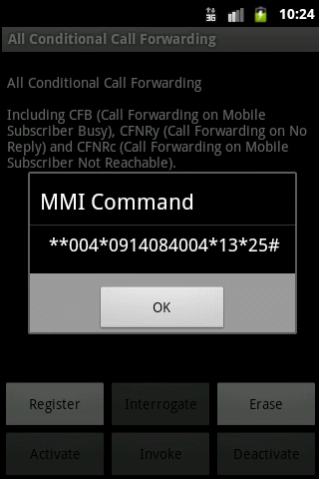
- [NEW!] You can choose from 2 operation modes: On-Air Mode (true working mode) and Reference Mode. In the Reference Mode, you can see the MMI commands (Man-Machine-Interface commands, for example to display an IMEI dial *#06#, or to check the status of call forwarding dial *#21#) that you can enable these settings on any another phone (e.g Symbian, Windows Mobile, iOS or even non-OS phone) by dialing it on the phone's keypad.
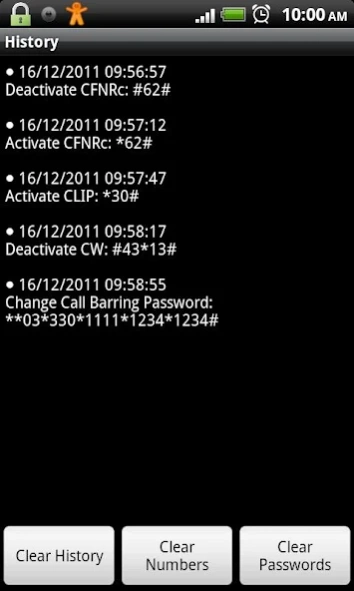
- [NEW!] History that logs all actions that may change your phone's behavior.
- [To-Do] Add your own Custom Code/Custom USSD/Custom MMI command.
★ Abbreviations:
- CFU: Call Forwarding Unconditional
- CFB: Call Forwarding on Mobile Subscriber Busy
- CFNRy: Call Forwarding on No Reply
- CFNRc: Call Forwarding on Not Reachable
- BAOC: Barring of All Outgoing Calls
- BOIC: Barring of Outgoing International Calls
- BOIC-exHC: BOIC except to Home Country
- BAIC: Barring of All Incoming Calls
- BIC-Roam: Barring of Incoming Calls when Roaming
- CLIP: Calling Line Identification Presentation
- CLIR: Calling Line Identification Restriction
- CoLP: Connected Line Identification Presentation
- CoLR: Connected Line Identification Restriction
- CW: Call Waiting
- CH: Call Hold
- ECT: Explicit Call Transfer
- MPTY: Multi-Party
- PIN/PIN2: Personal Identification Number
- PUK/PUK2: PIN Unblocking Key
- IMEI: International Mobile Equipment Identity
Any comment or suggestion are very welcome. Please visit:
http://forum.xda-developers.com/showthread.php?t=1365132
About Advanced Call Settings
The company that develops Advanced Call Settings is vndnguyen. The latest version released by its developer is 1.3.2.
To install Advanced Call Settings on your Android device, just click the green Continue To App button above to start the installation process. The app is listed on our website since 2018-01-02 and was downloaded 0 times. We have already checked if the download link is safe, however for your own protection we recommend that you scan the downloaded app with your antivirus. Your antivirus may detect the Advanced Call Settings as malware as malware if the download link to org.vndnguyen.advcallsettings is broken.
How to install Advanced Call Settings on your Android device:
- Click on the Continue To App button on our website. This will redirect you to Google Play.
- Once the Advanced Call Settings is shown in the Google Play listing of your Android device, you can start its download and installation. Tap on the Install button located below the search bar and to the right of the app icon.
- A pop-up window with the permissions required by Advanced Call Settings will be shown. Click on Accept to continue the process.
- Advanced Call Settings will be downloaded onto your device, displaying a progress. Once the download completes, the installation will start and you'll get a notification after the installation is finished.
Program Details
System requirements
Download information
Pricing
Version History
version 1.3.2
posted on 2018-01-02
1.3.2: Bug fixes and stability improvements.
1.3.0:
- UI improvements
- Introduce to the ad-free version.
1.2.5: Introdution to the NEW app: Dialpad Shortcut Widgets. The widgets that help to create a shortcut to any phone number or MMI or USSD command on the homescreen. So you can access to the supplementary services in a quick, easy and convenience way, with a single click.
1.2.2: Added Android hidden code for GTalk Service Monitor *#*#TALK#*#* (*#*#8255#*#*)
version 1.3.1
posted on 2015-11-22
1.3.1:,- Bug fixes.,1.3.0:,- UI improvements,- Introduce to the ad-free version.,1.2.5: Introdution to the NEW app: Dialpad Shortcut Widgets. The widgets that help to create a shortcut to any phone number or MMI or USSD command on the homescreen. So you can access to the supplementary services in a quick, easy and convenience way, with a single click.,1.2.2: Added Android hidden code for GTalk Service Monitor *#*#TALK#*#* (*#*#8255#*#*)
version 1.3.0
posted on 2014-06-15
Disclaimer
External Download
We do not host Advanced Call Settings on our servers. We did not scan it for viruses, adware, spyware or other type of malware. This app is hosted by Galad and passed their terms and conditions to be listed there. We recommend caution when installing it.
The APK Download link for Advanced Call Settings is provided to you by apps112.com without any warranties, representations or guarantees of any kind, so access it at your own risk.
If you have questions regarding this particular app contact the publisher directly. For questions about the functionalities of apps112.com contact us.
